In this post I’ll show how to use the Xcode build rules to convert Markdown files to HTML.
Since I started writing this blog using Markdown I’ve grown very fond of it’s clean and simple markup. Instead of being distracted by html the focus is on the text itself. To generate a few pages of content for a new application I’m currently developing I decided to use Markdown instead of writing the html myself.
Using a build rule I convert the Markdown source files to html and wrap them in a template file that contains styling and other page information.
The build rule
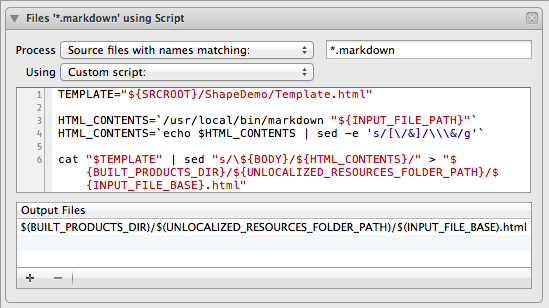
(See my buildrule.sh gist to copy paste text)
What this does:
- Defines a location for the template
- Generates html from the source file into variable
HTML_CONTENTS - Escapes
HTML_CONTENTSso it can be used in asedreplacement - Replaces the string
${BODY}in the template file with the contents ofHTML_CONTENTSand writes toFilename.htmlinto the resources folder
This rule will generate a File.html for every File.markdown in the app its Resources directory. This will only happen if the original markdown file has changed since the last build. Make sure you add the markdown file to your target as a member otherwise the build rule will just ignore the file.
Dependencies
You’ll need to have a utility to convert your markdown source to html. I chose to use peg-markdown which can easily be installed using Homebrew.
brew install markdown
# Installs markdown in /usr/local/bin/markdown
This utility takes a markdown file as input argument and writes the generated HTML to the stdout.
Demo
Check out the example Xcode project that demonstrates the build rule usage. The application shows a single window with HTML content generated from a Markdown file.